Loading…

Transform your body into a virtual controller. BodyWalk VR Motion Mapper translates your physical leg movements into standard XInput or WASD inputs. Experience plug-and-play VR locomotion in your favorite games—if a game supports joystick or keyboard movement, you can play it with your body.
Price history tracked since Jul 7, 2026 · vs all tracked offers.
Based solely on tracked price history — not purchase advice.
Tracked since Jul 7, 2026.
Steam Social Deduction Fest ends
Official stores with direct support.
BodyWalk VR Motion Mapper translates your physical movements and controller gestures into standard game inputs. Lean, step, jump, or trigger actions with custom hand gestures — your body becomes the controller.
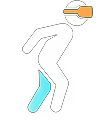
Steer by leaning your head. Walk in place to move. No extra trackers or smartphones needed.
Requires: VR Headset only
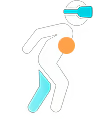
Move by leaning your torso. No stepping required — speed scales with tilt angle.
Requires: Phone or Chest Tracker
Lean to steer, walk in place to move. Steps are tracked from your torso movement.
Requires: Phone or Chest Tracker
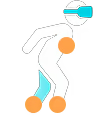
Most accurate profile. Torso steers, dedicated leg trackers measure steps for precise 1:1 speed tracking.
Requires: Chest Tracker + 2 Leg Trackers
Walk in place physically to move forward in-game. Your physical steps translate into virtual motion in real-time.
Requires: VR Headset and Controllers
Bring true VR interactions to games that were never designed for 3D or VR. By translating your physical movements into standard keyboard/gamepad inputs, you can physically reach over your shoulder to pull out a weapon in classic Doom or Cyberpunk 2077, or swing your actual hand to strike with a sword, instead of just pressing a button.
Gesture: Record a motion in the air. Repeat it to trigger the action (e.g., swing your arm to perform a melee attack).
Position Trigger: Define a spatial zone around your body. Reach over your shoulder to draw a shotgun, or touch your hip to pull a pistol.
Static Pose: Save a specific hand or body pose. Hold it in real life to activate the bound key (like raising your arm to block with a shield).
Strike Zone: Define a target area in front of you. Physically swing your controller through the zone to trigger an attack in-game.
Requires: VR Headset
BodyWalk includes a built-in FlatVR viewer that captures any game, app, or video and displays it on a massive curved virtual screen inside your headset.
🧠 AI-Powered 3D Depth (Universal)
A real-time neural network generates a depth map of anything on screen — turning flat 2D into volumetric 3D with real depth perception. Works with everything: old games without depth support, movies, YouTube videos, even your desktop.*
*AI 3D requires an NVIDIA GPU (RTX 3060 or higher). ReShade depth works on any GPU but depends on game compatibility.
🎮 True Game Depth (ReShade)
For supported games, BodyWalk injects into the rendering pipeline and extracts the real depth buffer — pixel-perfect 3D using the actual geometry data the game renders internally. No AI needed.
Features:
Curved virtual cinema screen with customizable size, distance, and curvature
Ambilight effect — screen colors bleed into the surrounding VR environment
Head tracking with mouse emulation — look around naturally in any game
Virtual monitor support — bypass 60Hz display limits for smooth VR playback
Combine with BodyWalk locomotion to walk physically through any flat game
Requires: Just 1 Smartphone
No headset? No problem. Strap a phone to your chest and play PC games with body movement mapped to WASD or Xbox controller.
🏃 Eliminates VR sickness — Your body moves in sync with the game. No more sensory mismatch.
🙌 Frees your hands — Legs handle locomotion, hands handle combat and interaction.
🔌 Works with any game — Outputs standard XInput (Gamepad) or WASD (Keyboard). If a game supports a controller or keyboard, it works.
📱 No special hardware — Start with just a smartphone.
Your body already knows how to move — let it. Wishlist BodyWalk VR Motion Mapper and leave the thumbsticks behind.
(Note: Head Tilt + Steps works with just your VR headset — no extra hardware needed. Other locomotion profiles use the free BodyWalkTracker smartphone app or compatible hardware trackers. Gesture mapping works with your existing VR controllers.)