
Loading…

With a cheerful smile and endless punches, blast your way forward! A 2D action game that's easy for anyone to enjoy!
No offers tracked in PLN yet.
P-PAN DEMO
P-PAN is a simple, pick-up-and-play 2D action game.
Falling off platforms? No worries, you can fly anytime you want!
Punch enemies, collect loot, and unleash special moves whenever you like.
Find your rhythm and push onward!
You can change the display language and control keys from the F1 settings menu.
1. During gameplay, press the F1 key to display the settings menu at the top of the screen.
(This window may open small; drag the bottom right corner to enlarge it.)
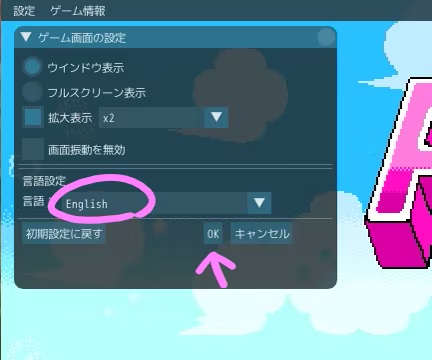
2. After changing the settings, press OK.
3. The changes will be applied after restarting the game.
Move: ↑↓←→
Fly: ↑
Jump, Confirm: Z
Punch, Cancel: X
Special Move: D
Pause, Skip: W
*You can customize the key assignments from the F1 key settings menu.
Keys will be assigned to controller buttons (Default type).
After making your settings, press OK to close the window and restart the game to apply the changes.
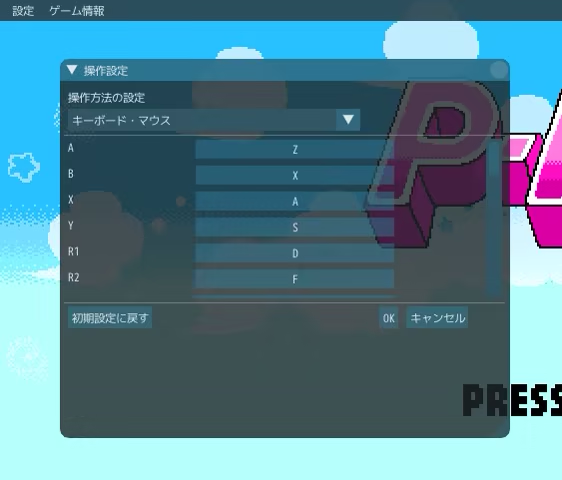
*Key customization will not be reflected in the text or guide display within the game screen.
The mouse can only be used to operate the settings window mentioned above; it is not supported within the game itself.
This demo allows you to play through the tutorial through Stage 3.
START: Play the game. Once you've cleared a stage, you can select it from the Panchu Island map.
(Pressing pause during a stage will return you to the map.)
COLLECTION: Open the prizes you've earned.
MANUAL... Replay the tutorial or check game hints.
SETTING… Adjust the volume of music and sound effects to your liking. and also change the display of control.
SOUND... Adjust the music and sound effects volume to your liking.
EXIT... Exit the game.
The trial version does not have a save function, so data will not transfer to the full version.
High scores are displayed on the results screen, but please note that all high scores will be lost when you exit the game.
Game content may change in the full version.
This game was created using Pixel Game Maker MV.
(C) palpuni 2026
