

Planet X3 (DOS)
Planet X3 is a new retro real-time strategy game for DOS. You are up against the Protoids. You need to mine resources, build infrastructure and build offensive units to defeat them. All while protecting your bases. Relive the VGA, AdLib and keyboard controls experience of early 90s PC gaming.

Offers
What are keyshops?Official stores
Official stores with direct support.
Multipacks (1)

About Planet X3 (DOS)
HOW TO PLAY
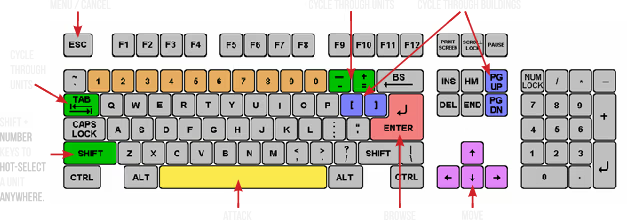
Although there are many other keys to learn, these are the main keys you need tooperate the game. Some keys do the exact same thing, such as the bracket keys or
page up/page down keys. This will mostly be your preference, and possibly what sort
of keyboard your computer has.
At the top of the screen you’ll find three boxes displaying your current resources, which
include minerals, gas, and energy. You will need to collect more of these, which we’ll
get into later. 255 is the maximum number of resources you can store at any given
time. Next to the resources is a running clock showing how long the game has been
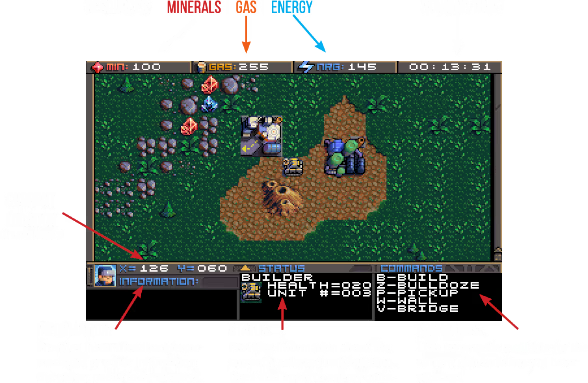
going. On the bottom you’ll find your current coordinates. This is very important for
knowing where your units are, especially in relation to the enemy bases. More on this
later. The bottom three windows are there to give you different types of information.
SWITCHING BETWEEN UNITS
In this game, you will be controlling dozens of different units, so it’s important to
know how to switch between them. There is more than one way to accomplish it, and
you should learn all of the ways.
Browse - If the unit you want to control is visible on the screen, you can press Return
to enter browse mode. At this point, a small box-like cursor will appear on the screen.
Use the arrow keys to move this box around until it is positioned on the unit or
building you wish to select, then press Return again. You can even select enemy units,
but you can only look at their status, not control them.
Cycle Units - For things like tanks, builders, and frigates. If the unit you want is not
currently visible and you don’t feel like driving to the unit, you can press the Tab
key to cycle to the next unit, wherever it may be. The cycle is based on unit number,
so sometimes it may seem there is no rhyme or reason as to which unit it goes to
next. You can also use the plus and minus keys on the keyboard to move forward and
backwards through your units. With practice, this is the fastest way to switch between
units.
Cycle Buildings - For things like factories, smelters, and radar stations. If the building
you want is not currently visible, you may press Page-up / Page-down to cycle back
and forth between them, very much like the unit cycle. You can also use the bracket
keys [ and ] to accomplish the same thing. Solar panels are purposely skipped during
the cycle because there are often numerous panels and you can’t actually control
them anyway. If you want to select a solar panel you must use the browse feature.
Hot Keys - You can use the number row 0-9 at the top of your keyboard to assign spe-
cific units or buildings that you need to access more quickly. Press Shift + Number to
assign a number key to the current unit. You can then use that number key to quickly
switch to the assigned unit. This will be especially useful during battles.
CONTROLLING UNITS
Your first order of business after starting the game should be establishing infrastructure and collecting resources.Without them, you won’t be able to do much.
You’ll need all 3 types of resources: Minerals, Gas, and Energy.
It may require some hunting around the map to
find the minerals and gas, so we’ll talk about
those first. You can find these on the map.
There are usually deposits of minerals
clumped together. Some maps have a
lot, and some have very few, so use them
wisely. In this screenshot, you can see
several rocks and crystals in a formation.
Both the rocks and crystals can be used
as mineral sources. The formations that
look like volcanos are gas vents. You will need to build a refinery on top of them.
The more the better.
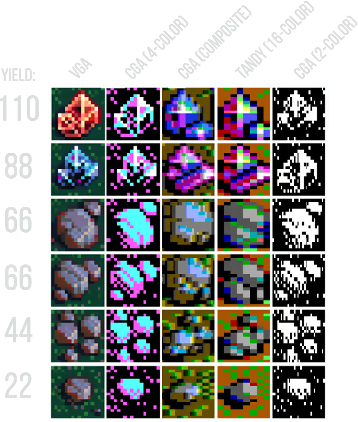
Different types of rocks will process at different speeds and also have different yields.
Also, the minerals can look somewhat different depending on which graphics mode
you are in. This chart shows each one and how many minerals you can expect to get
as a result of mining each kind.
Different types of rocks will process at different speeds and also have different yields.
Also, the minerals can look somewhat different depending on which graphics mode
you are in. This chart shows each one and how many minerals you can expect to get
as a result of mining each kind.
Game details
Game details
Age ratings
Game modes
Languages
Features
Planet X3 (DOS) price history
Lowest tracked price: PLN 45.99 (Jul 7, 2026) · current best: PLN 45.99.
Planet X3 (DOS) reviews
100% positive reviews all-time.
Planet X3 (DOS) — frequently asked questions
Where can I buy Planet X3 (DOS) at the cheapest price?
Right now the cheapest offer for Planet X3 (DOS) is PLN 45.99 at Steam. KingsPrice compares 1 offers from 1 stores — official stores and keyshops — and refreshes prices throughout the day.
What is the lowest price Planet X3 (DOS) has ever been?
The lowest price KingsPrice has tracked for Planet X3 (DOS) is PLN 45.99 (recorded on Jul 7, 2026). This covers the stores and period we monitor — set a price alert to catch the next drop to that level.
How can I get Planet X3 (DOS) at a discount?
Create a free price alert on this page and KingsPrice will email you when Planet X3 (DOS) drops below your chosen price. The biggest discounts usually appear during seasonal Steam sales and publisher promotions — the sale calendar on this page shows the next confirmed event.
System requirements
Minimum
- OS *: Windows 7
- Storage: 35 MB available space
Recommended
- Storage: 150 MB available space


