

Movavi Slideshow Maker 8
Turn your favorite photos and videos into a captivating slideshow. Add music, special effects, transitions, and stickers, then upload the results to YouTube right from within the program. Creating and sharing videos with Movavi is as easy as 1-2-3!

Offers
What are keyshops?Keyshops
Third-party resellers. Often cheaper, without official store support. Keyshop prices vs Steam →


Multipacks (1)
DLCs (7)


About Movavi Slideshow Maker 8
Movavi Slideshow Maker
is the fastest and easiest way to make a stunning slideshow for any purpose: a birthday gift, a compilation of your best gaming moments, a work presentation, and more.New features:
- Fast Track HD
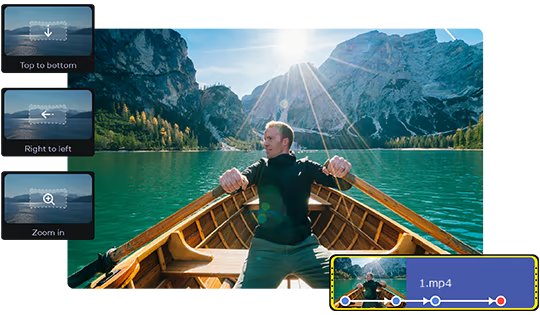
- Upgraded Pan & Zoom tool
- Audio enhancement tools and effects
- Sound visualization
- Motion tracking
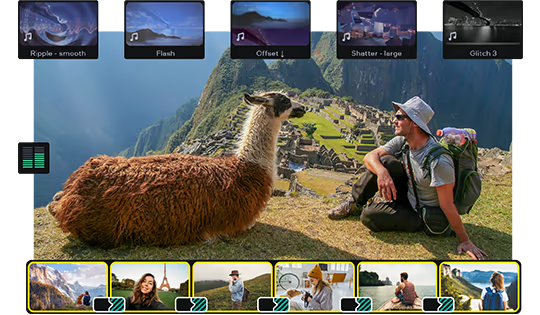
- Transitions with built-in audio
- Change audio speed without changing the tone
- Vertical screen adaptation
- Object tracking
- Export video quality controls
Let Your Creativity Flow
Upload any footage you have: holiday pictures, funny videos, or even game screenshots. Move, split and cut slides, and join them together with spectacular transitions — especially, transitions with built-in sounds. Make as many adjustments as you need: crop and rotate pictures, boost colors, normalize sound in clips, and more. Add the music of your choice and have the slides advance following the rhythm of that music. You can also add a voice-over and record images from your webcam or an external device. The program can now also detect vertical videos and will ask you to change aspect ratios after you upload your file. It is also possible to watch videos on tablets and laptops. Thanks to the Fast Track HD technology, you can now work with HD movies with no lags.Start with the Slideshow Wizard
Try the Slideshow Wizard if you’re just starting to use the program. It’s an automated approach that helps you create videos in no time. All you need to do is import your files and choose a theme. The program will create a presentation in the blink of an eye. You can also set the target video length and change the titles. Already have a favorite transition style? Create a custom theme and use it whenever you want.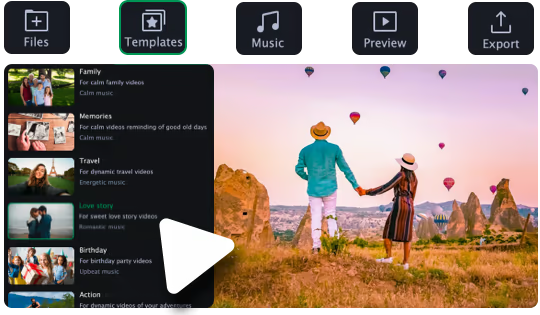
Give It the Perfect Look
Try zooming in and out of pictures, use the fade-to-black effect, or make your slides roll over. Thanks to the upgraded Pan & Zoom tool, you can now use several presets one by one. Use filters to sharpen details, reduce camera shake, and make your images brighter and more colorful. Use the Transition Wizard to join all clips at once and smooth out the flow of your presentation. You can make it even more dynamic by adding transitions to both main and supplementaryl tracks! Another cool feature is object tracking: now you can choose scenes featuring your favorite characters and work with them only.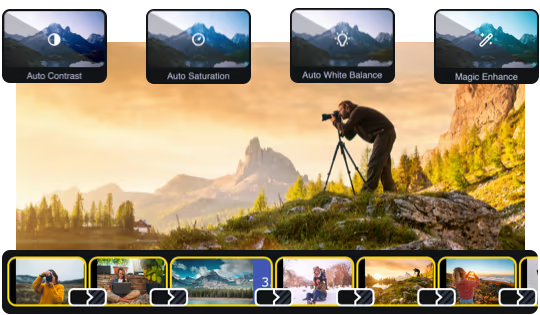
Audio enhancement
Use new audio tools to optimize videos with poor audio quality. Choose the decibel level and get rid of any noises lower than that. Lower the difference between loud and soft noises. With audio effects, you can distort music and voice. But you can also save the original sound — for example, change audio speed without changing the tone. Sound visualizer will help you to eliminate noise jumps during the montage.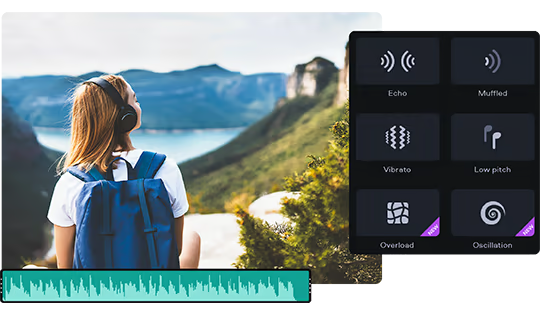
Try Hollywood-Style Directing
Add a Hollywood touch to your visuals and throw in some special effects. Use Chroma Key to change the background and place your characters in completely different surroundings. Add dynamic elements with the Pan & Zoom tool. Slow-motion will create suspense and have your viewers on the edge of their seats. If you want to cut out scenes with a particular character, try the Scene Detection. Thanks to the Motion Tracking tool, you can now link titles to any moving objects.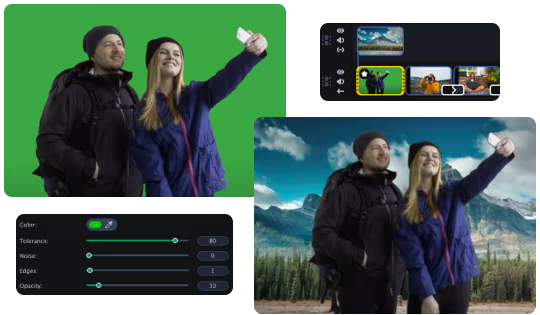
Save and Show!
After the presentation is complete, save it in a popular format like AVI, MOV, or MP4, or use a device-specific conversion profile. . Use video quality controls on the export. You can also easily share your video with friends and instantly upload it to YouTube right from within the program.
Game details
Game details
Age ratings
Languages
Movavi Slideshow Maker 8 price history
Lowest tracked price: €14.18 (Jul 16, 2026) · current best: €14.18 across 3 stores.
Movavi Slideshow Maker 8 reviews
73% positive reviews all-time.
Movavi Slideshow Maker 8 — frequently asked questions
Where can I buy Movavi Slideshow Maker 8 at the cheapest price?
Right now the cheapest offer for Movavi Slideshow Maker 8 is €14.18 at Eneba. KingsPrice compares 3 offers from 3 stores — official stores and keyshops — and refreshes prices throughout the day.
What is the lowest price Movavi Slideshow Maker 8 has ever been?
The lowest price KingsPrice has tracked for Movavi Slideshow Maker 8 is €14.18 (recorded on Jul 16, 2026). This covers the stores and period we monitor — set a price alert to catch the next drop to that level.
Is it safe to buy a Movavi Slideshow Maker 8 Steam key from a keyshop?
Keyshops are marketplaces that resell game keys, usually below official store prices. The keyshops listed on KingsPrice deliver genuine Steam keys, but buyer protection differs from official stores — check the shop's rating and refund policy before buying. You can hide keyshop offers at any time with the keyshops toggle. Keyshop prices vs Steam →
How can I get Movavi Slideshow Maker 8 at a discount?
Create a free price alert on this page and KingsPrice will email you when Movavi Slideshow Maker 8 drops below your chosen price. The biggest discounts usually appear during seasonal Steam sales and publisher promotions — the sale calendar on this page shows the next confirmed event.
System requirements
Minimum
- OS *: Microsoft® Windows® 7/8/10/11 with up-to-date patches and service packs installed
- Processor: Intel®, AMD®, or compatible dual-core processor, 1.5 GHz
- Memory: 2 GB RAM
- Graphics: NVIDIA® GeForce® series 8, Intel® HD Graphics 2000, AMD Radeon™ R600 or higher graphics card with up-to-date drivers
- Storage: 500 MB available space
Similar at tracked lows


Games like Movavi Slideshow Maker 8 (8)
 70% match
 69% match
 69% match
 69% match-50%
 68% match
 66% match
 65% match
 65% match