

Mocap2D
Convert 3D FBX & BVH motion capture into professional 2D animation. Automatically retarget animations to Spine and Unity 2D skeletons with Smart or Direct Retargeting. Compatible with virtually any standard FBX or BVH animation library.

Offers
What are keyshops?Official stores
Official stores with direct support.
Multipacks (2)


About Mocap2D
MOCAP2D
Convert 3D Motion Capture into Professional 2D Animation
Bring high-quality 3D motion capture animations directly into your 2D animation workflow.
MOCAP2D imports FBX and BVH animations, intelligently retargets them to your 2D skeletons, and lets you preview the results in real time before exporting.
Map your rig once, then transfer an unlimited number of animations using the same skeleton—saving countless hours of manual animation work.
Compatible with official Spine Runtimes and Unity 2D Animation Package.
ONE-TIME RIG SETUP
Stop mapping bones for every animation.
Once your 2D skeleton has been matched to a 3D rig, every FBX or BVH animation using the same hierarchy can be transferred automatically.
Perfect for large mocap libraries, animation packs and production pipelines.
AUTO MATCH
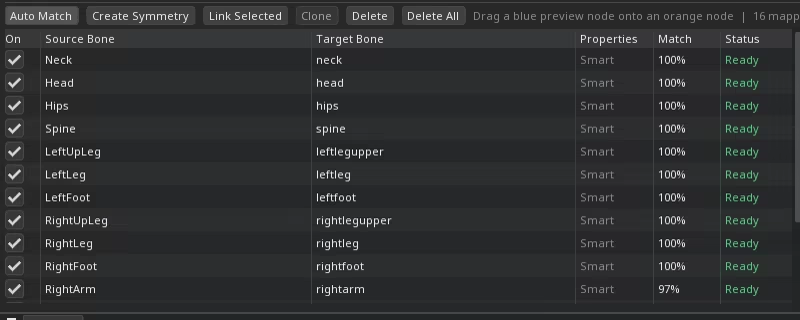
Automatically matches the source and destination skeletons by analyzing bone names and hierarchy.
Most rigs can be mapped with a single click, while every bone remains fully editable whenever manual adjustments are needed.
Spend less time configuring and more time animating.
TWO RETARGETING MODES

Different projects require different workflows.
MOCAP2D includes two independent retargeting systems.
Smart Retargeting
Designed for speed and natural-looking animation.
Motion is transferred using projection calculations based on the visual relationship between the source and destination skeletons.
This mode delivers excellent results with minimal setup and is especially effective for side-view characters.
Direct Retargeting (Advanced)
Need complete control?
Direct mode allows every destination bone to receive any transform component from any source bone.
Transfer Position, Rotation or Scale individually on each axis to build completely custom retargeting setups.
Perfect for unusual rigs, stylized characters and advanced animation workflows.
AUTOMATIC IN-PLACE CONVERSION
Don't worry whether your source animation is moving through the world.
MOCAP2D can automatically convert locomotion animations into perfectly looping in-place animations during retargeting.
No external editing required.
BUILT-IN GROUND CONTACT (IK)
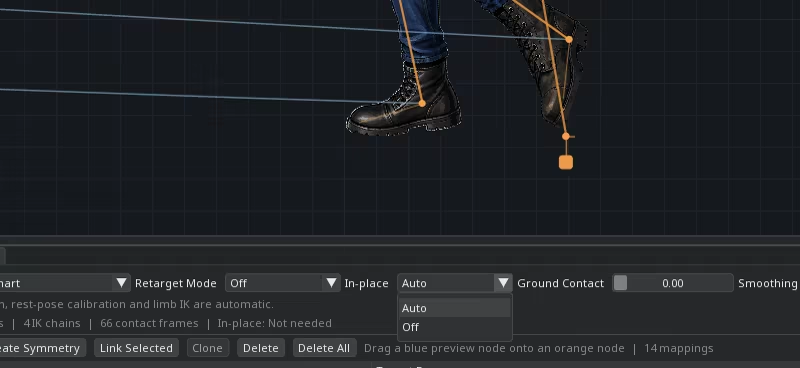
Natural foot placement matters.
MOCAP2D features a built-in IK system that automatically keeps feet—or any ground-contact limbs—locked in place while the rest of the body adjusts accordingly.
This dramatically reduces foot sliding and produces animations much closer to the original motion capture performance.
LIVE PREVIEW
See every change instantly.
Adjust mappings, retargeting settings and animation parameters while the preview updates in real time.
Know exactly what your exported animation will look like before saving.
IMPORT & EXPORT INDUSTRY-STANDARD FORMATS
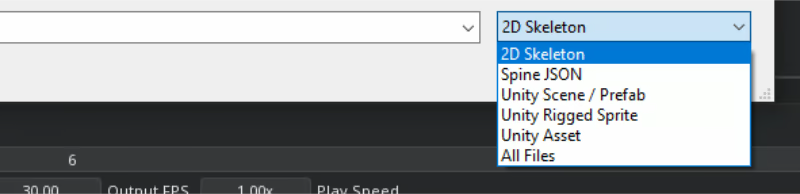
Designed to fit directly into professional animation pipelines.
Import and export industry-standard formats including:
FBX Motion Capture
BVH Motion Capture
Spine Skeletons
Unity 2D Animation Package
Preview the final animation exactly as it will be exported.
DRAG & DROP EVERYTHING
Import your files as easily as dragging them into the window.
Drop FBX animations, BVH files, Spine projects or Unity skeletons directly into the scene and start working immediately.
No complicated import dialogs.
WORK THE WAY YOU WANT
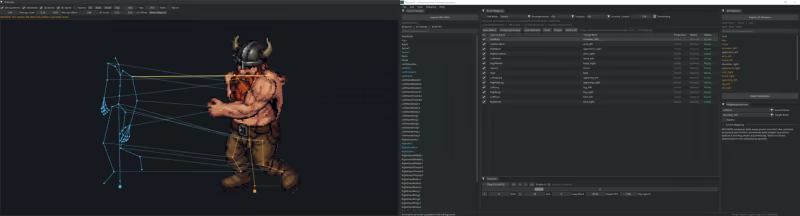
Create your own workspace.
Dock, undock, resize and rearrange every panel across one or multiple monitors to build the layout that best fits your production workflow.
BUILT FOR LARGE ANIMATION LIBRARIES
Whether you're working with dozens or thousands of animations, MOCAP2D is designed to eliminate repetitive setup.
Map your skeleton once and reuse the same configuration for every compatible animation.
Spend your time creating—not repeating the same work.
PERFECT FOR
Indie Game Developers
Professional Animators
Spine Artists
Unity Developers
Motion Capture Pipelines
2D Character Animation
Mobile Games
PC & Console Games
WHY MOCAP2D?
✔ Import FBX & BVH motion capture files
✔ Automatic bone matching
✔ Smart Retargeting
✔ Advanced Direct Retargeting
✔ Automatic In-Place Conversion
✔ Built-in Ground Contact IK
✔ Real-Time Animation Preview
✔ Drag & Drop Workflow
✔ Fully Dockable Workspace
✔ Multi-Monitor Support
✔ Compatible with Official Spine Runtimes
✔ Compatible with Unity 2D Animation Package
✔ Reuse one rig setup for unlimited compatible animations
COMPATIBLE WITH VIRTUALLY ANY FBX OR BVH ANIMATION
MOCAP2D is compatible with virtually every standard FBX and BVH animation library available today.
Import motion capture data from your favorite tools, online marketplaces or commercial animation packs and transfer them directly to your 2D characters.
Works seamlessly with:
Mixamo
Rokoko Motion Library
ActorCore
Reallusion
MotionBuilder
Blender
Maya
3ds Max
Cascadeur
DeepMotion
Custom FBX/BVH animations
and virtually any standard FBX or BVH animation source.
One skeleton mapping.
Unlimited compatible animations.
Game details
Game details
Languages
Mocap2D price history
Lowest tracked price: CA$12.99 (Jul 7, 2026) · current best: CA$25.99.
Mocap2D reviews
60% positive reviews all-time.
Mocap2D — frequently asked questions
Where can I buy Mocap2D at the cheapest price?
Right now the cheapest offer for Mocap2D is CA$25.99 at Steam. KingsPrice compares 1 offers from 1 stores — official stores and keyshops — and refreshes prices throughout the day.
What is the lowest price Mocap2D has ever been?
The lowest price KingsPrice has tracked for Mocap2D is CA$12.99 (recorded on Jul 7, 2026). This covers the stores and period we monitor — set a price alert to catch the next drop to that level.
How can I get Mocap2D at a discount?
Create a free price alert on this page and KingsPrice will email you when Mocap2D drops below your chosen price. The biggest discounts usually appear during seasonal Steam sales and publisher promotions — the sale calendar on this page shows the next confirmed event.
System requirements
Minimum
- Requires a 64-bit processor and operating system
- OS: Windows 10
- Processor: Intel i5
- Memory: 4096 MB RAM
- Graphics: Onboard
- DirectX: Version 11
- Storage: 120 MB available space
Recommended
- Requires a 64-bit processor and operating system
- OS: Windows 10
- Processor: Intel i5
- Memory: 8192 MB RAM
- Graphics: GTX 1050 TI
- DirectX: Version 11
- Storage: 120 MB available space


