

openCanvas 7
openCanvas is a painting software dedicated to Windows Operating System, that is suitable to beginners to advanced users. Equipped with analog-like brush strokes and functional yet user-friendly interface, openCanvas has the higher basic performance and the unique "Event" function that enables to record and replay the drawing...

Offers
What are keyshops?Official stores
Official stores with direct support.

Keyshops
Third-party resellers. Often cheaper, without official store support. Keyshop prices vs Steam →

Multipacks (3)


About openCanvas 7
Equipped with analog-like brush strokes and functional yet user-friendly interface, openCanvas has the higher basic performance and the unique "Event" function that enables to record and replay the drawing procedure.
Various functions and excellent performance of openCanvas strongly support visualizing your creativity.
Enjoy creating an illustration with openCanvas!
Why don't you open a new "Canvas" on your desktop?
Function
- Brushes enabling the various expressions
openCanvas brush option offers pencil, pen, watercolor, air brush, and more that enables to create various unique expressions.
openCanvas7 is equipped with the refurbished, improved brush engine that enables even more various expressions.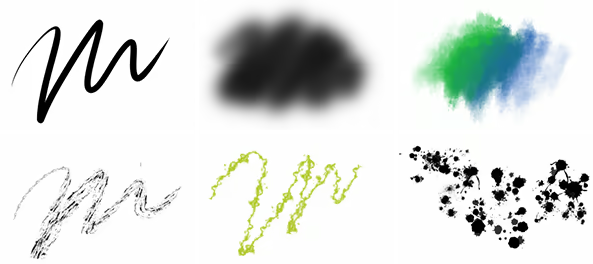
- Extensive Brush Preset
There are more than 150 types of default brush preset.
A brush can be customized freely so that you can create and save your own brush. - New Brush Engine
The drawing engine has been improved and it now supports multiple threading.
This made the drawing performance substantially improved. And it enables to support a pen tablet tilt/ rotation and to set up the further detailed parameter setting.
Even further expressions is available.
Below functions are available with the new brush engine:- Pen Tablet Tilt and Rotation (*for the supported devices only)
- Scatter Drawing
- Roller Drawing
- Symmetrical Drawing
- Pen Tablet Tilt and Rotation (*for the supported devices only)
- Layer Mode
22 types of Layer Mode let you express an unlimited possibility, such as by adjusting brightness, altering contrast, changing color tone, and more. Layer Mode except few options has compatibility to Adobe Photoshop.(※)
※Please note that it is the Layer Mode compatibility, but the display result is not guaranteed. - Filter
openCanvas has 40 types of filter. Filter lets you adjust colors, apply texture, and more.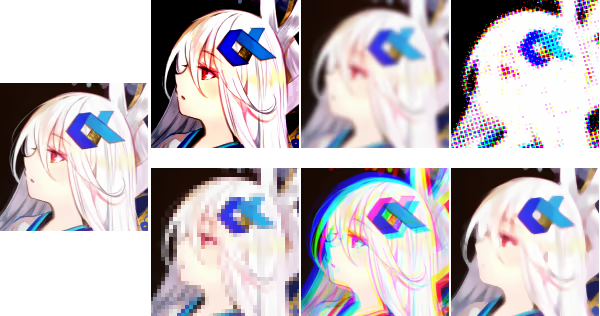
- Ruler
Perspective ruler helps you to create a three-dimensional illustration and to draw a precise building. There are one-point, two-point, and three-point perspective rulers. Parallel, radial, concentric circle rulers are not only convenient for creating effect lines but also useful for drawing background objects. - Event Function
Have you ever wondered, "How has the illustration been created?"
The greatest feature of GraphicEditor openCanvas is the Event function that enables you to record/replay the drawing procedure. By using this function, it shows the drawing procedure, that you have never been able to watch, via openCanvas software or the PGN community website.
You can learn drawing techniques, brush setting, filter usage, and many more from advanced users.
GraphicEditor openCanvas is not just the drawing software but also lets you enjoy and learn illustration techniques.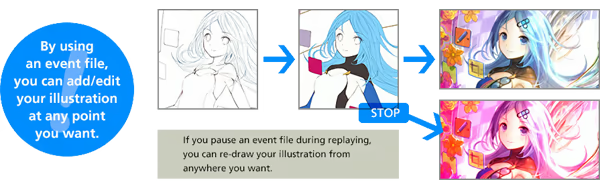
- Compatible to PSD format
openCanvas supports saving as the PSD(Photoshop) format. You can open the openCanvas file in other software such as Adobe Photoshop, SAI, CLIP STUDIO PAINT, etc. while keeping most of layer information and layer modes. (※)
※Please note that there might be a slight difference in the display result in other software due to the difference of composition algorithm.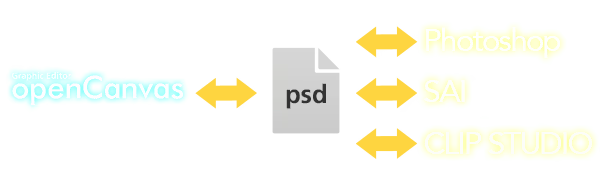
- TabletPC Function Support
Pen pressure (*1) and multi-touch gesture (*2) are available in TabletPC.
It will make you feel like drawing on paper and let you control canvas intuitively.
※1 Only with the pen pressure supported device.
※2 Only with the multi-touch supported device.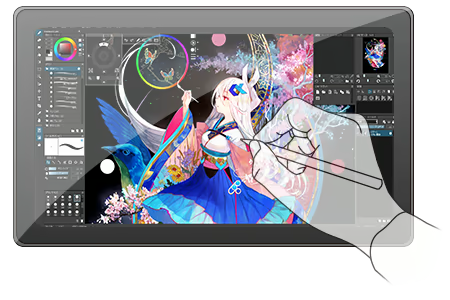
UI
- Refurbished User Interface Design
The theme color and icons has been refurbished, and which offers the user-friendly User Interface design. - Supporting High DPI Display
High-definition display offers a wider canvas and fine texts/ icons.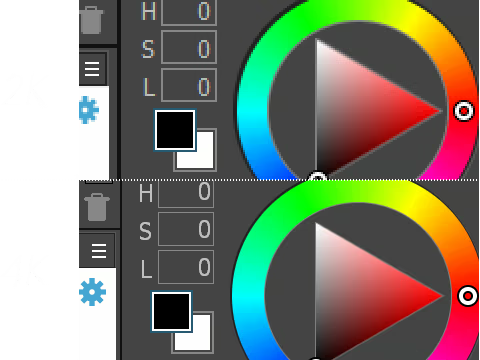
- Grabber Control
openCanvas' unique Hand tool lets you move, rotate, scale, flip vertical easily. Hand is available by pressing the space key. You can also temporarily switch to Hand while using the brush tool.
It is located within the canvas, and which enables users to touch it easily.
Background is translucent so that it will not disrupt your drawing progress.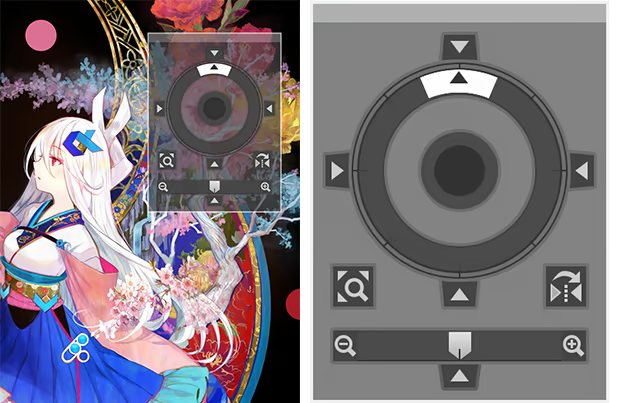
- Shortcut Control
Frequently used tools are consolidated.
You can resize the control however you like, vertically and horizontally.
Background is translucent so that it will not disrupt your drawing progress.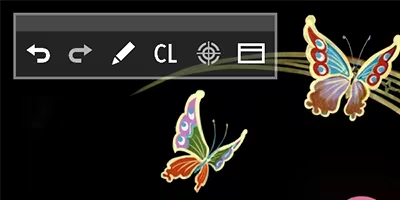
Game details
Game details
Languages
Features
openCanvas 7 price history
Lowest tracked price: £31.50 (Jul 7, 2026) · current best: £37.85 across 3 stores.
openCanvas 7 player count & reviews
77% positive reviews all-time · 45 peak players in the last 30 days.
openCanvas 7 — frequently asked questions
Where can I buy openCanvas 7 at the cheapest price?
Right now the cheapest offer for openCanvas 7 is £37.85 at K4G. KingsPrice compares 3 offers from 3 stores — official stores and keyshops — and refreshes prices throughout the day.
What is the lowest price openCanvas 7 has ever been?
The lowest price KingsPrice has tracked for openCanvas 7 is £31.50 (recorded on Jul 7, 2026). This covers the stores and period we monitor — set a price alert to catch the next drop to that level.
How many people play openCanvas 7?
openCanvas 7 peaked at 45 concurrent players on Steam in the last 30 days (highest on Jul 12, 2026). The player chart on this page updates daily.
Is it safe to buy a openCanvas 7 Steam key from a keyshop?
Keyshops are marketplaces that resell game keys, usually below official store prices. The keyshops listed on KingsPrice deliver genuine Steam keys, but buyer protection differs from official stores — check the shop's rating and refund policy before buying. You can hide keyshop offers at any time with the keyshops toggle. Keyshop prices vs Steam →
How can I get openCanvas 7 at a discount?
Create a free price alert on this page and KingsPrice will email you when openCanvas 7 drops below your chosen price. The biggest discounts usually appear during seasonal Steam sales and publisher promotions — the sale calendar on this page shows the next confirmed event.
System requirements
Minimum
- OS *: Windows 7
- Processor: x86 compatible processor supporting SSE2
- Memory: 500 MB RAM
- Graphics: 1280x768 / True Color
- Network: Broadband Internet connection
- Storage: 100 MB available space
- Additional Notes: Supporting the pen pressure with Wacom tablet / Supporting the pen pressure with Tablet PC compatible to TabletPC API
Recommended
- OS *: Windows 7 or newer
- Processor: x86 compatible processor supporting SSE2
- Memory: 8 GB RAM
- Graphics: 1920x1080 / True Color
- Network: Broadband Internet connection
- Storage: 8 GB available space
- Additional Notes: Supporting the pen pressure with Wacom tablet / Supporting the pen pressure with Tablet PC compatible to TabletPC API


