ePaperCraft SHIRYU
Design paper craft models on your PC, unfold them into printable templates, and build your own creations with scissors, glue, and paper. Includes 70+ ready-to-build models.

Offers
What are keyshops?Official stores
Official stores with direct support.
About ePaperCraft SHIRYU
QUICK REFERENCE
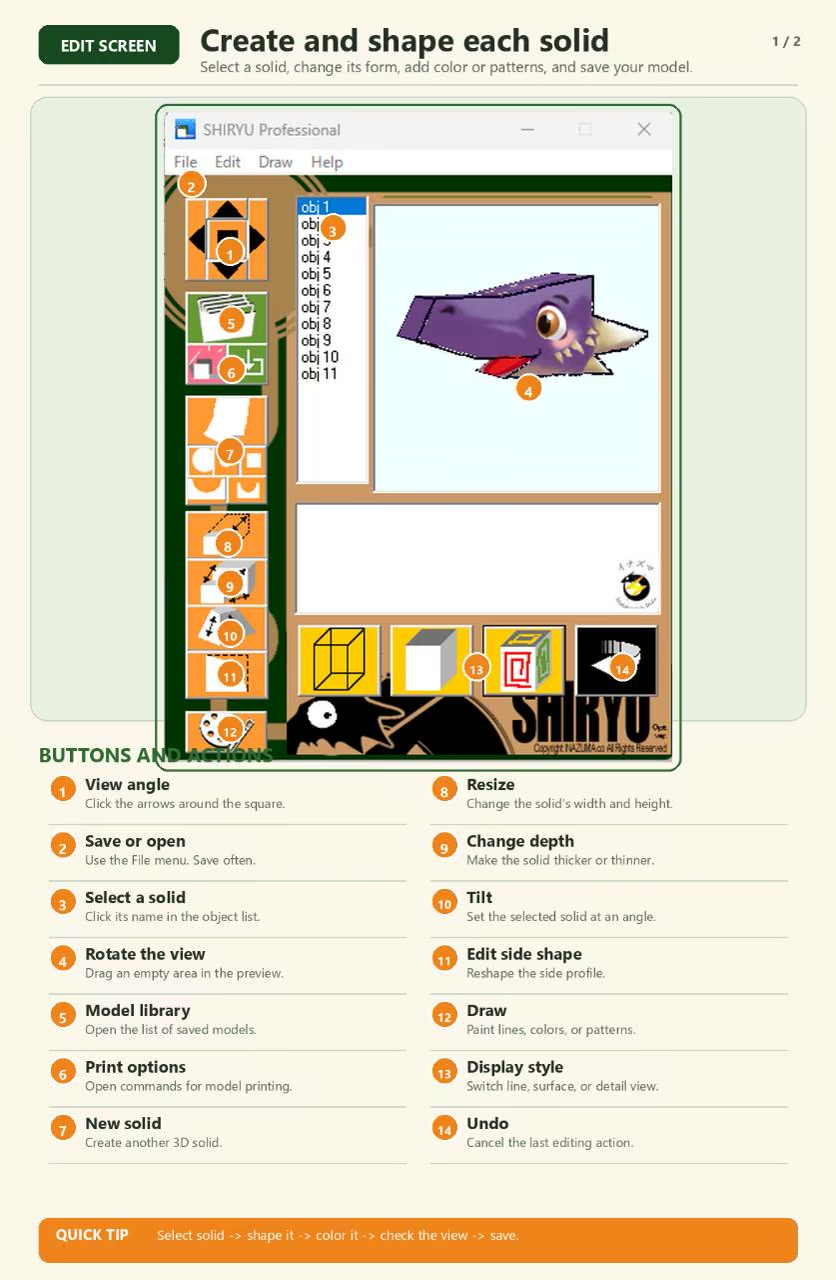
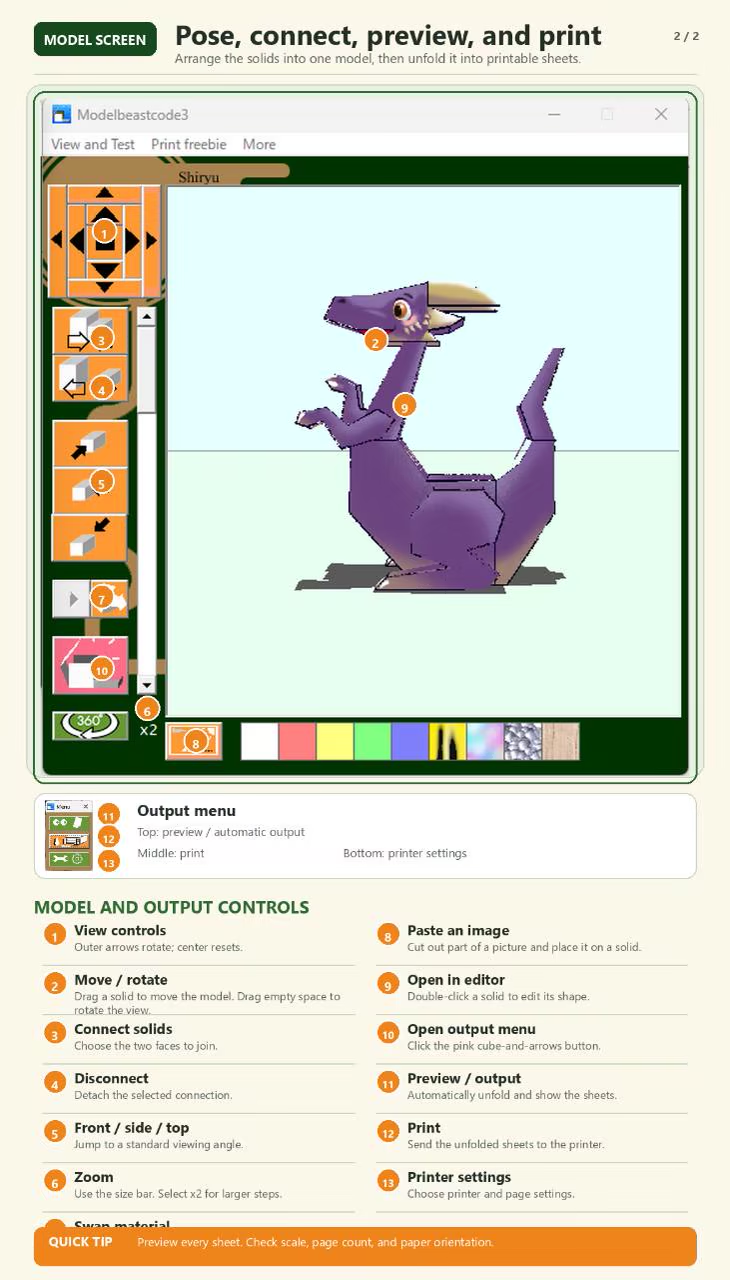
Start here. These two pages show the main controls for editing parts, connecting them, previewing unfolded sheets, and printing.
START CRAFTING IN MINUTES
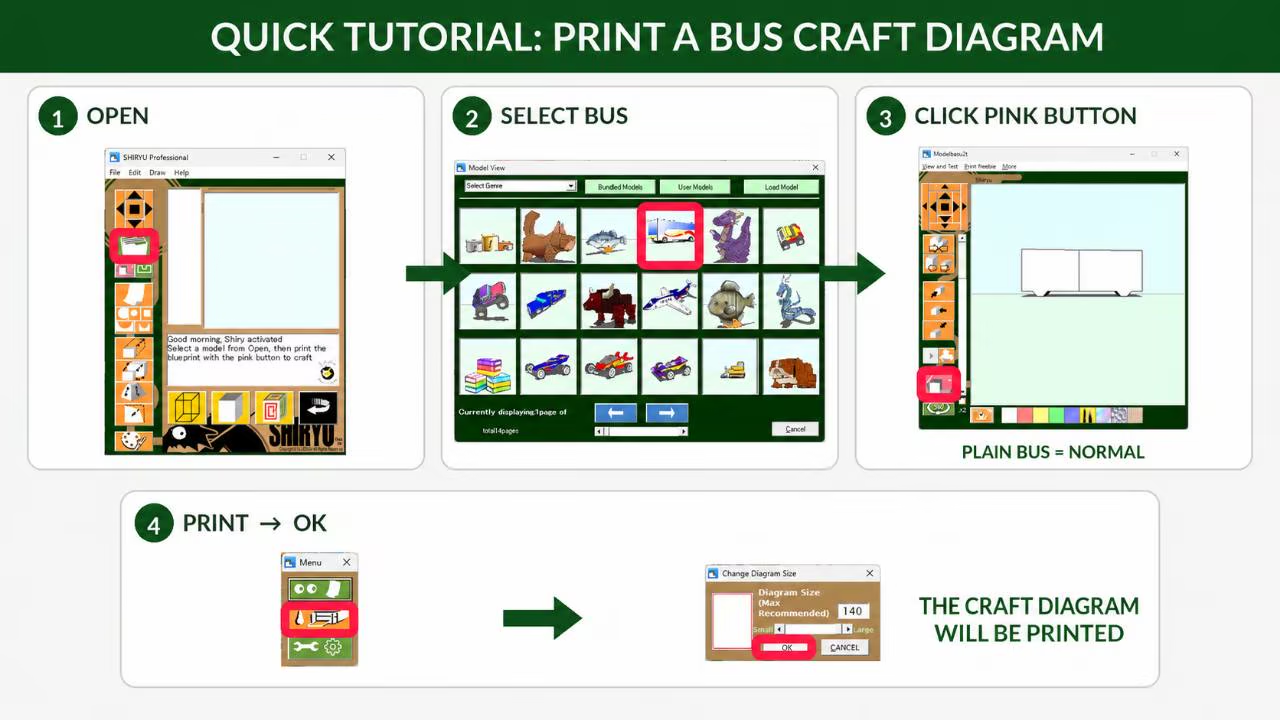
Choose from more than 70 included models, print a craft diagram, and start building. Follow the pink boxes below for the fastest route from opening SHIRYU to printing.
DESIGN, UNFOLD, PRINT, BUILD
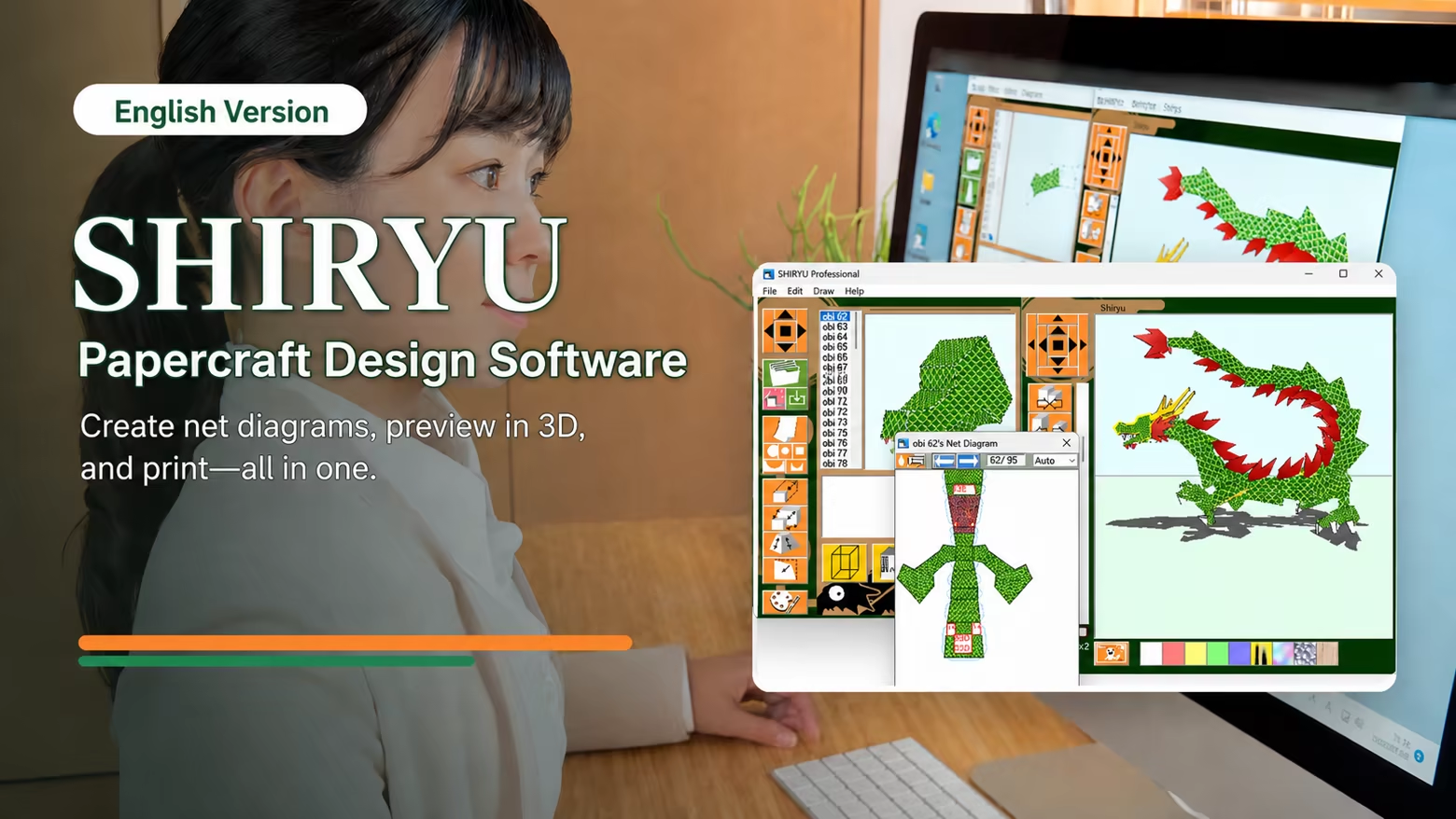
SHIRYU is paper craft design software for creating original printable paper models. Build a 3D model on screen, unfold it into paper parts, arrange the printable layout, and assemble the real object with paper, scissors, and glue.
JURY-SELECTED ROOTS, EXPANDED FOR STEAM
The original paper craft modeling software by Takahiro Yonemura was named a Jury Selection in the Entertainment Division of the 10th Japan Media Arts Festival. This Steam release is its expanded and improved successor, carrying that creative concept forward with more models and enhanced features.
SHIRYU connects digital design with hands-on making for hobbyists, educators, makers, artists, and first-time paper craft designers.
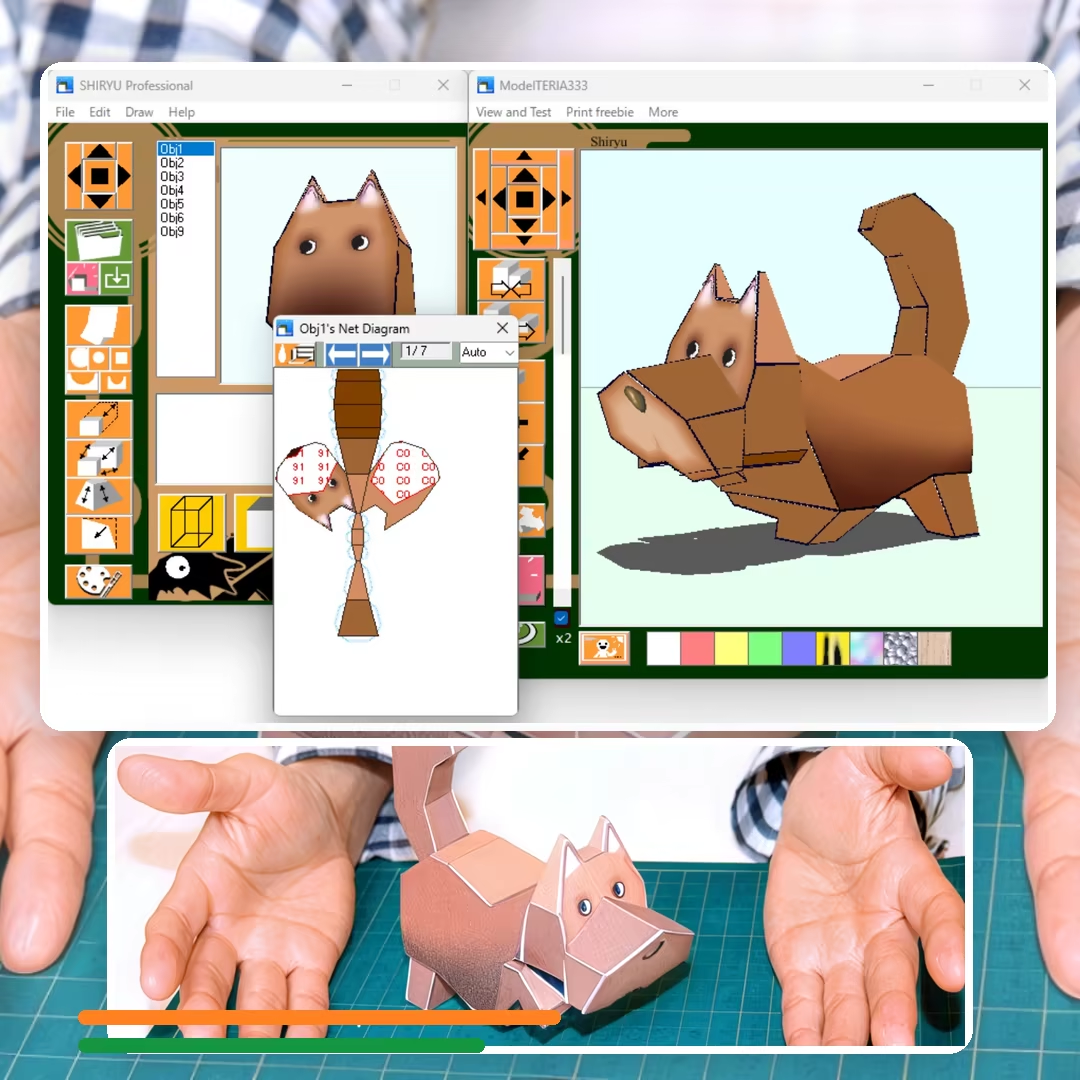
KEY FEATURES
• Create and edit original paper craft models on your PC.
• Start with more than 70 ready-to-build included models.
• Convert 3D shapes into printable unfolded patterns.
• Edit and arrange paper parts before printing.
• Print templates for real-world assembly.
• Use your own original works commercially.
• Suitable for hobby projects, education, workshops, and creative prototyping.
SIMPLE TO BEGIN, OPEN TO EXPERIMENTATION
SHIRYU has been used successfully by elementary school students, yet it leaves room for careful manual work and inventive model design. Start from an included example, learn how the parts fit together, and move on to creating paper models of your own.
CREATE YOUR OWN PAPER MODELS
Follow this complete white-cat example to see which buttons to use from a new outline through printing and assembly.
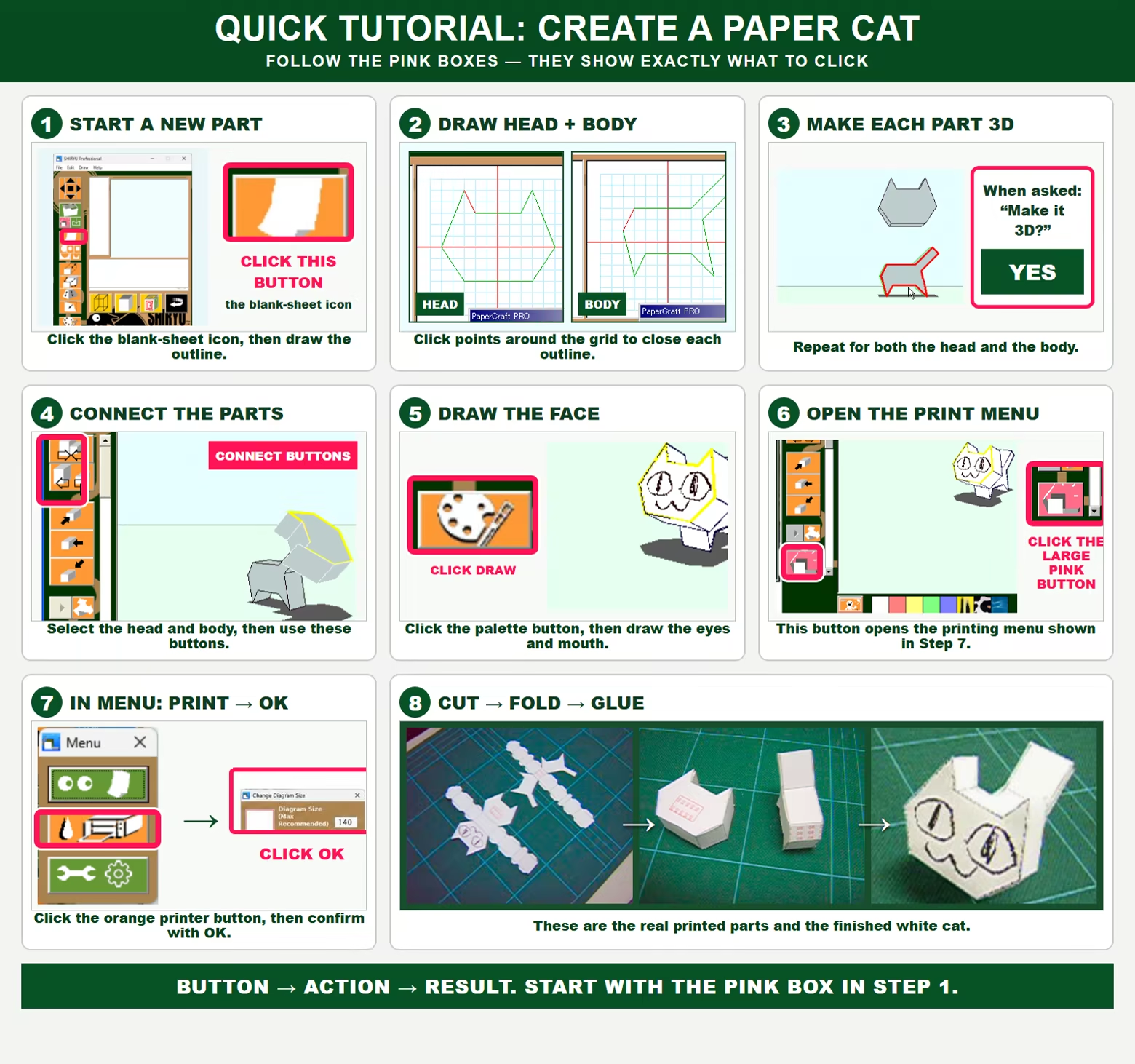
IMPORTANT NOTES
Final assembly requires paper, a printer, cutting tools, adhesive, and manual crafting work.
SHIRYU is intended for hobby, educational, and creative use. It is not industrial CAD/CAM software and should not be used where professional manufacturing accuracy, engineering tolerance control, or safety-critical precision is required. Small differences can arise from model geometry, printer settings, paper thickness, cutting, folding, gluing, and manual assembly.
No generative AI was used to create the included models or the program code.
Game details
Game details
Age ratings
Languages
ePaperCraft SHIRYU price history
Lowest tracked price: £4.13 (Jul 24, 2026) · current best: £4.13.
ePaperCraft SHIRYU player count & reviews
100% positive reviews all-time · 0 peak players in the last 30 days.
ePaperCraft SHIRYU — frequently asked questions
Where can I buy ePaperCraft SHIRYU at the cheapest price?
Right now the cheapest offer for ePaperCraft SHIRYU is £4.13 at Steam. KingsPrice compares 1 offers from 1 stores — official stores and keyshops — and refreshes prices throughout the day.
What is the lowest price ePaperCraft SHIRYU has ever been?
The lowest price KingsPrice has tracked for ePaperCraft SHIRYU is £4.13 (recorded on Jul 24, 2026). This covers the stores and period we monitor — set a price alert to catch the next drop to that level.
How many people play ePaperCraft SHIRYU?
ePaperCraft SHIRYU peaked at 0 concurrent players on Steam in the last 30 days (highest on Jul 17, 2026). The player chart on this page updates daily.
How can I get ePaperCraft SHIRYU at a discount?
Create a free price alert on this page and KingsPrice will email you when ePaperCraft SHIRYU drops below your chosen price. The biggest discounts usually appear during seasonal Steam sales and publisher promotions — the sale calendar on this page shows the next confirmed event.
System requirements
Minimum
- OS: Windows11 / Windows10
- Memory: 2 GB RAM
- Storage: 100 MB available space
Recommended
- Memory: 4 GB RAM
- Storage: 200 MB available space